We cover here some of the challenges importing JSON data into an SQL database and how to resolve them. Most major databases have added support for JSON but keeping data in JSON format causes serious performance issues when searching, filtering or sorting data.
The example below assumes that the JSON data is generated from a Firestore database and imported into a Postgresql database, but the same concepts apply to any JSON source and transactional database destination.
We look specifically at:
- Extracting the object identifiers from JSON to use them as primary indexes for the SQL table
- Converting datetime datatypes from JSON to Postgres
- Extracting a single JSON element into multiple table columns
- Extracting a single JSON collection into a separate database table linked to the main table
The source of the data used in this article is the following:
{
  "leases": {
    "20261": {
      "active": false,
      "periodicity": "monthly",
      "startTime": {
        "_seconds": 1752352200,
        "_nanoseconds": 874000000
      },
      "Deposit": {
        "Amount": 0,
        "CurrencyCode": 0
      },
      "Address": {
        "AdressLine": "12 ch pointe nord",
        "CountryCode": "CA",
        "Locality": "montréal"
      },
      "units": [
        "101", "102", "103"
      ],
      "subCollection": {
        "tenants": {
          "tenant1": {
            "paymentId": "2025121234",
            "checkinState": "accepted"
          },
          "tenant2": {
            "paymentId": "202512131234",
            "checkinState": "refused"
          }
        }
      }
    },
    "20262": {
      "active": true,
      "periodicity": "monthly",
      "startTime": {
        "_seconds": 1753396200,
        "_nanoseconds": 0
      },
      "Deposit": {
        "Amount": 0,
        "CurrencyCode": 0
      },
      "Address": {
        "AdressLine": "12 ch pointe nord",
        "CountryCode": "CA",
        "Locality": "montréal"
      },
      "units": [
	    "501"
	  ],
      "subCollection": {
        "tenants": {
          "tenant3": {
            "paymentId": "",
            "checkinState": "pending"
          },
          "tenant4": {
            "paymentId": "",
            "checkinState": "pending"
          }
        }
      }
    }
  }
}
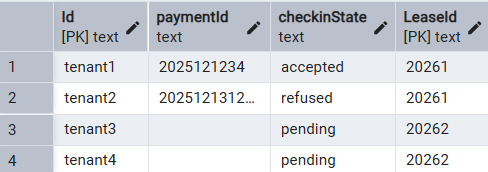
The final result that we want to obtain are these 2 tables:
“Leases” table:

“Tenants” tables:
Extracting the object identifiers from JSON data
The problem with object identifiers is that they are not in the usual Key:Value format. In our example, we need to extract the “Lease” identifiers such as “20261” and “20262” and also the “Tenant” identifiers (“Tenant1” to “Tenant4”.) To achieve this, we are going to add a temporary “position” column to each table and use the standard jsonb_object_keys function to extract the object identifiers in the order in which they appear in the data. Here’s a function that allows us to do that:
-- get_id: extracts the object identifier depending on the location of the object inside a JSON document
-- can be used to retrieve the object IDs for top level objects or nested objects
-- pos: position or index of the object for which to retrieve the id
-- jdoc: JSON document containing all the objects
-- object_type: Empty string for top level objects or the object type for nested objects
create or replace function get_id(pos int, jdoc jsonb, object_type text) returns text AS
  $$
  DECLARE doc_id text;
begin
  IF object_type != '' THEN
  	doc_id = (SELECT key_ FROM jsonb_object_keys(jdoc -> object_type) AS key_ LIMIT 1 OFFSET (pos-1));
  ELSE
  	doc_id = (SELECT key_ FROM jsonb_object_keys(jdoc) AS key_ LIMIT 1 OFFSET (pos-1));
  END IF;

  return doc_id;
end;
  $$
  LANGUAGE PLPGSQL;
Adding a column for the object IDs is implemented as follows:
CREATE TABLE "leases" AS
SELECT get_id(pos, sample_data.data, 'leases') "Id", -- use the get_id function to retrieve the object Id
  je.*
FROM
  sample_data
CROSS JOIN
  JSON_TABLE (
    sample_data.data,
    '$."leases".*' COLUMNS (
      pos for ordinality,    -- temporary column to hold the object position in the JSON file
       ...
      )
    ) AS je;

-- remove the temporary pos column
ALTER TABLE "leases"
	DROP COLUMN pos;
Converting datetime datatypes from JSON to Postgres
Date and time fields extracted in JSON format often have a format that is different from the SQL timestamp format. A conversion between the two formats is needed. In the case of Firestore, the datetime value can come as a JSON object containing two fields: _seconds and _nanoseconds. E.g.:
"startTime": {
        "_seconds": 1752352200,
        "_nanoseconds": 874000000
      }
We can convert these fields to an SQL timestamp as follows:
CREATE TABLE "leases" AS
SELECT to_timestamp("startTime_") "startTime", -- use the to_timestamp function to convert the seconds value to a timestamp
	je.*
FROM
    sample_data
CROSS JOIN
    JSON_TABLE (
      sample_data.data,
      '$."leases".*' COLUMNS (
          "startTime_" integer PATH '$.startTime._seconds', -- retrieve the _seconds value from the embedded startTime object
          ...
	  )
    ) AS je;

-- remove the temporary startTime_ column
ALTER TABLE "leases"
	DROP COLUMN startTime_;
Extract a single JSON element into multiple columns
Fields that are used in searching, filtering or sorting records are best stored in separate columns. We can split into separate columns an existing JSON object such as:
"Address": {
        "AdressLine": "12 ch pointe nord",
        "CountryCode": "CA",
        "Locality": "montréal"
      }
This is done in SQL as follows:
CREATE TABLE "leases" AS
	je.*
FROM
    sample_data
CROSS JOIN
    JSON_TABLE (
      sample_data.data,
      '$."leases".*' COLUMNS (
       -- splitting the Address fields into 3 separate fields
       NESTED PATH '$.Address' COLUMNS (
          "AddressLine" text PATH '$.AdressLine',
          "CountryCode" text PATH '$.CountryCode',
          "Locality" text PATH '$.Locality'
        ),
        ...
      )
    ) AS je;
Extract a single JSON array into a separate table
JSON collections containing a limited number of items can remain a single field in the database. For large collections, performance is improved by extracting the collection into a separate table linked to the main table by an ID. In our example, the collection of “Tenants” for each “Lease” is not expected to be large but for demonstration purposes, we will extract it into a separate “Tenants” table.
"subCollection": {
        "tenants": {
          "tenant1": {
            "paymentId": "2025121234",
            "checkinState": "accepted"
          },
          "tenant2": {
            "paymentId": "202512131234",
            "checkinState": "refused"
          }
        }
      }
Again we are going to create a temporary column containing the “Tenants”, move the “Tenants” to a separate table, then drop the temporary column. The “Tenants” objects also need to have their IDs extracted from the JSON data so we will use the same get_id function as we did for the main table.
CREATE TABLE "leases" AS
	je.*
FROM
    sample_data
CROSS JOIN
    JSON_TABLE (
        sample_data.data,
        '$."leases".*' COLUMNS (
            "tenants" jsonb PATH '$.subCollection.tenants' -- temporary column containing the tenants
        ...
	)
    ) AS je;

CREATE TABLE "tenants" AS
SELECT get_id(pos, t."tenants", '') "Id",
	je.*,
	t."Id" "LeaseId"
FROM
    (SELECT "Id", "tenants" FROM "leases") AS t
CROSS JOIN
    JSON_TABLE (
        t."tenants",
        '$.*' COLUMNS (
	    pos for ordinality,    -- temporary column to hold the object position in the JSON file
            "paymentId" text PATH '$.paymentId',
            "checkinState" text PATH '$.checkinState'
         )
    ) AS je;
The full SQL code to import our sample data is as follows:
DROP TABLE IF EXISTS "leases";
DROP TABLE IF EXISTS "tenants";
DROP TABLE IF EXISTS "sample_data";

---------------------------------------------------------

-- get_id: extracts the object identifier depending on the location of the object inside a JSON document
-- can be use to retrieve the object IDs for top level objects or nested objects
-- pos: position or index of the object for which to retrieve the id
-- jdoc: JSON document containing all the objects
-- object_type: Empty string for top level objects or the object type for nested objects
create or replace function get_id(pos int, jdoc jsonb, object_type text) returns text AS
  $$
  DECLARE doc_id text;
begin
  IF object_type != '' THEN
  	doc_id = (SELECT key_ FROM jsonb_object_keys(jdoc -> object_type) AS key_ LIMIT 1 OFFSET (pos-1));
  ELSE
  	doc_id = (SELECT key_ FROM jsonb_object_keys(jdoc) AS key_ LIMIT 1 OFFSET (pos-1));
  END IF;

  return doc_id;
end;
  $$
  LANGUAGE PLPGSQL;

---------------------------------------------------------

-- create a temporary table to import the json file into a single row/column
CREATE TEMP TABLE sample_data(data jsonb);
INSERT INTO sample_data(data)
	SELECT pg_read_file('c:\temp\sample.json')::jsonb;

---------------------------------------------------------

CREATE TABLE "leases" AS
SELECT get_id(pos, sample_data.data, 'leases') "Id", -- use the get_id function to retrieve the object Id
	to_timestamp("startTime_") "startTime", -- use the to_timestamp function to convert the seconds value to a timestamp
	je.*
FROM
    sample_data
CROSS JOIN
    JSON_TABLE (
        sample_data.data,
        '$."leases".*' COLUMNS (
			pos for ordinality,		-- temporary column to hold the object position in the JSON file
            "active" boolean PATH '$.active',
            "periodicity" text PATH '$.periodicity',
            "startTime_" integer PATH '$.startTime._seconds', -- retrieve the _seconds value from the embedded startTime object
            "Deposit" jsonb PATH '$.Deposit',
			-- splitting the Address fields into 3 separate fields
            NESTED PATH '$.Address' COLUMNS (
                "AddressLine" text PATH '$.AdressLine',
                "CountryCode" text PATH '$.CountryCode',
                "Locality" text PATH '$.Locality'
            ),
            "units" text[] PATH '$.units',
            "tenants" jsonb PATH '$.subCollection.tenants'   -- temporary column containing the tenants
			)
    ) AS je;

---------------------------------------------------------

CREATE TABLE "tenants" AS
SELECT get_id(pos, t."tenants", '') "Id",
	je.*,
	t."Id" "LeaseId"
FROM
    (SELECT "Id", "tenants" FROM "leases") AS t
CROSS JOIN
    JSON_TABLE (
        t."tenants",
        '$.*' COLUMNS (
	    pos for ordinality,    -- temporary column to hold the object position in the JSON file
            "paymentId" text PATH '$.paymentId',
            "checkinState" text PATH '$.checkinState'
            )
    ) AS je
	;


ALTER TABLE "tenants"
	DROP COLUMN pos,
	ADD CONSTRAINT tenants_pkey PRIMARY KEY ("LeaseId", "Id");

-- GRANT ALL ON TABLE public.tenants TO "admin";
-- GRANT SELECT,INSERT,UPDATE ON TABLE public.tenants TO "user";

---------------------------------------------------------

ALTER TABLE "leases"
	DROP COLUMN pos,
	DROP COLUMN "startTime_",
    DROP COLUMN "tenants",
	ADD CONSTRAINT leases_pkey PRIMARY KEY ("Id");

-- GRANT ALL ON TABLE public.leases TO "admin";
-- GRANT SELECT,INSERT,UPDATE ON TABLE public.leases TO "user";

---------------------------------------------------------